


Close Menu
    Facebook X (Twitter) Instagram Pinterest WhatsApp Discord
    TechzureTechzure
    • Blog
      1. Crypto
      2. Windows
      3. View All

      How to Make an Account on Metamask

      March 20, 2023

      Crypto Testnet Faucets: How They Work and Should You Use Them?

      March 10, 2023

      Is Cryptocurrency The Future of Money?

      February 15, 2023

      Crypto and Blockchain Explained

      February 10, 2023

      RAM: The Unsung Hero Powering Modern Computing

      October 22, 2021

      Mastering the Windows Task Scheduler: Automation at Its Best

      October 11, 2021

      Unmasking Windows Driver Errors: Causes, Solutions, and Best Practices

      October 4, 2021

      Computer Storage: The Bedrock of Digital Progress

      January 3, 2021

      AI’s Societal Impact: Analysis & Adaptive Strategies

      May 26, 2025

      Smartwatch Evolution: From Timekeepers to Health Tools

      May 19, 2025

      Rise of Sophisticated Mobile Games & Monetization Models

      May 12, 2025

      How AI Enhances Gameplay with Adaptive Difficulty & NPCs

      May 5, 2025
    • Web
      1. WordPress
      2. SEO
      3. Hosting
      4. View All

      Resolve common HTTPS insecure site and mix-content warning Error

      February 3, 2020

      Backlink Breakdown: The Art and Science of Building Quality Links

      November 28, 2021

      The Power of Backlinks in SEO: A Deep Dive into Their Role, Quality, and Influence on Ranking

      November 21, 2021

      Mastering Web Design: Crafting User-Centric Experiences

      May 8, 2021

      The Role of Content in SEO: A Deep Dive into the Symbiotic Relationship

      May 3, 2021

      Building A Business With Unlimited Reseller Hosting

      March 13, 2020

      Backlink Breakdown: The Art and Science of Building Quality Links

      November 28, 2021

      The Power of Backlinks in SEO: A Deep Dive into Their Role, Quality, and Influence on Ranking

      November 21, 2021

      Understanding SSL: Ensuring Online Security

      November 12, 2021

      Streaming Wars: The Digital Transformation of Entertainment

      July 16, 2021
    • Gaming

      GTA Popularity Continues to Rising

      March 15, 2023

      Top Upcoming games and what to expect

      January 8, 2023

      Top Games of 2022

      December 7, 2022

      Play 2 Earn In Crypto

      September 3, 2022
    • News

      GTA Popularity Continues to Rising

      March 15, 2023

      The Rise of Private Trackers

      February 23, 2023

      Top Upcoming games and what to expect

      January 8, 2023

      Top Games of 2022

      December 7, 2022

      Is meta the future

      December 6, 2022
    • Reviews

      Best Grocery Shopping APP in India in 2020

      April 7, 2020
    • How-To Guides

      How to Make an Account on Metamask

      March 20, 2023

      How to Resolve Error 1923 occurs when you try to update Adobe Acrobat DC

      January 30, 2023

      How to change name pattern in Sharex

      January 24, 2023

      Maximizing Phone Battery Life: Essential Tips and Tricks

      September 21, 2021

      How to Make Money on Youtube

      August 21, 2021
    • Technology

      New Feature of Microsoft Edge: Constant Data Fetch from Chrome

      March 4, 2023

      Does NFT have a future?

      January 15, 2023

      Web3 Future

      October 4, 2022

      Understanding SSL: Ensuring Online Security

      November 12, 2021

      The Motherboard: The Heart and Soul of a Computer

      November 2, 2021
    TechzureTechzure
    Home - Technology - New Feature of Microsoft Edge: Constant Data Fetch from Chrome
    Technology

    New Feature of Microsoft Edge: Constant Data Fetch from Chrome

    JainBy JainMarch 4, 20234 Mins Read
    Facebook Twitter WhatsApp Telegram Email Pinterest
    edge

    Earlier this year, a new feature was announced for Microsoft Edge. After an update, Microsoft Edge will now be set to constantly fetch data from Google Chrome.

    Some users might be wondering what exactly this means. We’re here to walk you through exactly what this means for users of both Microsoft Edge and Google Chrome, what the benefits are, and how you can deactivate this feature if you do not want it to work on your machine.

    Follow along for a deep dive into what this means for browser users!

    How Does it Work?

    The first question that you might have is exactly how this works. Browsers like Microsoft Edge make an attempt to personalize your experience as much as possible. They do this by gathering as much information as possible.

    What this means for you if you use Microsoft Edge is that it will be looking for data in Google Chrome’s files that could be helpful for it to create a better user experience for you.

    What Data Will it Pull?

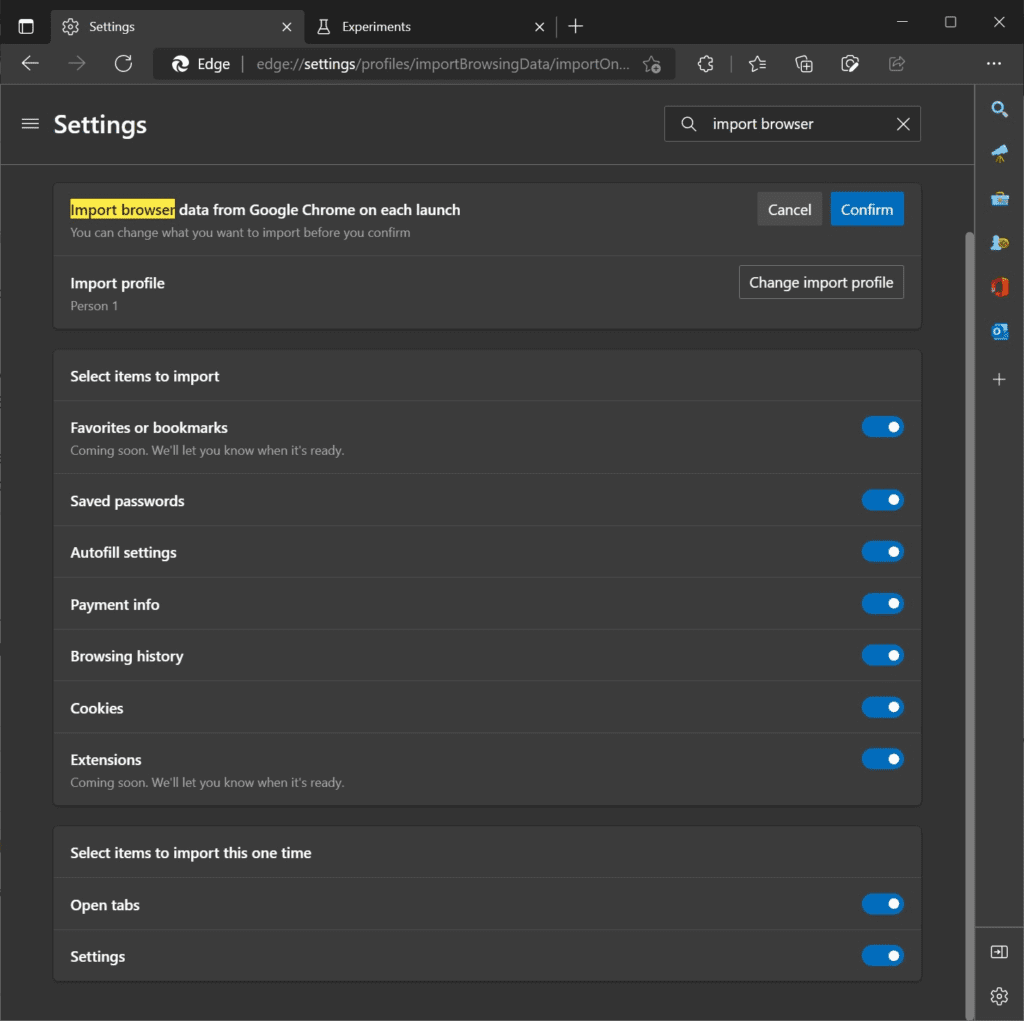
    The feature that is being rolled out will fetch any data that it deems relevant to creating a better user experience. It will pull tabs, history, bookmarks, and other information. It will then use this to make it easier for you to navigate the Microsoft Edge browser and accomplish what you need to do faster.

    Benefits of This Feature

    There’s a lot to love about this feature and for many users, it has been a long time coming. Here are some of the benefits of a feature like this and how it can help you get more out of your browser experience both in Google Chrome and Microsoft Edge.
    New Feature of Microsoft Edge: Constant Data Fetch from Chrome

    Faster Loading Times

    One of the benefits of this feature will be faster load times. Since Microsoft Edge can now import cache data, it can load your frequently visited web pages faster. When you start the Microsoft Edge browser, you won’t have to wait as long as you otherwise would for a web page to load. This can save a lot of time.

    Cross Platform Bookmarks

    Another piece of data that Edge can bring over from Chrome is your bookmarks. Have you ever been frustrated that one browser remembers your bookmarks but another one doesn’t have them? This problem can now be solved with these cross-platform bookmarks.

    Easier Logins

    Another part of your browsing experience that could be made easier by this feature is logins. Now, when you visit a web page that has a saved login from Chrome, you can import it to Edge. This eliminates the need to drudge up all of your old passwords and re-type them.

    Switch Between Browsers Easier

    In general, switching between browsers will be so much easier. If you have web pages that you like to visit with Chrome specifically or Edge specifically, you can now do so effortlessly.

    Edge will import Chrome tabs automatically so that you can quit Chrome and go to Edge whenever you need to. Once again, this ties into making using the Edge browser all the easier.

    Does This Put My Data at Risk?

    A common concern for people using these browsers is data security. With Edge constantly fetching data from Chrome, you might be naturally inclined to be concerned. After all, we are always hearing about the latest data breach.

    Fortunately, this isn’t much of a concern with Edge. Edge has a stellar reputation for using end-to-end encryption and ensuring that user data is protected.

    How to Disable This Feature

    Still not convinced? No worries. Edge has also implemented a toggle setting that can actually allow you to disable this feature, making it easy to opt-out. You can go to the settings of your Edge browser to disable it.

    If you ever decide that you want to have the feature after all, then you can always re-enable the feature and gain access to all of the benefits that it has to offer.

    Key Takeaways

    This feature that Microsoft Edge is rolling out is a highly-anticipated one. Users of Edge have been craving features of this that make the browser more user-friendly and packed with benefits. This should do the trick! Now that you know what Edge has to offer, you can take full advantage of these features!


    chrome data edge windows
    Share. Facebook Twitter Pinterest Email Reddit Telegram WhatsApp
    Previous ArticleThe Rise of Private Trackers
    Next Article Crypto Testnet Faucets: How They Work and Should You Use Them?

    Related Posts

    Gaming

    GTA Popularity Continues to Rising

    March 15, 20236 Mins Read
    How-To Guides

    How to Resolve Error 1923 occurs when you try to update Adobe Acrobat DC

    January 30, 20232 Mins Read
    Crypto

    Does NFT have a future?

    January 15, 20236 Mins Read
    Add A Comment
    Leave A Reply Cancel Reply

    Editors Picks

    The Proliferation of IoT: Making Everyday Objects Smart and Connected

    July 4, 2021

    Migrating Google Data from One Account to Another: A Comprehensive Guide

    August 8, 2020

    Navigating the Windows Task Scheduler: Optimization and Automation Unleashed

    November 9, 2020

    10 Best Gadgets for the Elderly to Simplify Life

    October 3, 2024

    The Evolution of YouTube: A Deep Dive into the World’s Premier Video Platform

    February 15, 2021
    • Techzure: Your Source for all things Techie Stuffs. We provide all the latest Tech, Games, Crypto news and reviews of World, Windows, Market & much more.
    Facebook X (Twitter) Pinterest Instagram RSS

    Categories

    • Blog
    • News
    • Crypto
    • How To
    • Gaming
    • Reviews
    • Technology

    Services

    • Advertise with US
    • Cookies Policy
    • Copyright
    • Newsletters
    • Sponsored News
    • Work With Us

    Subscribe to Updates

    Get the latest creative news from FooBar about art, design and business.

    © 2025 ThemeSphere. Designed by ThemeSphere.
    • Privacy Policy
    • Terms
    • Contact

    Type above and press Enter to search. Press Esc to cancel.